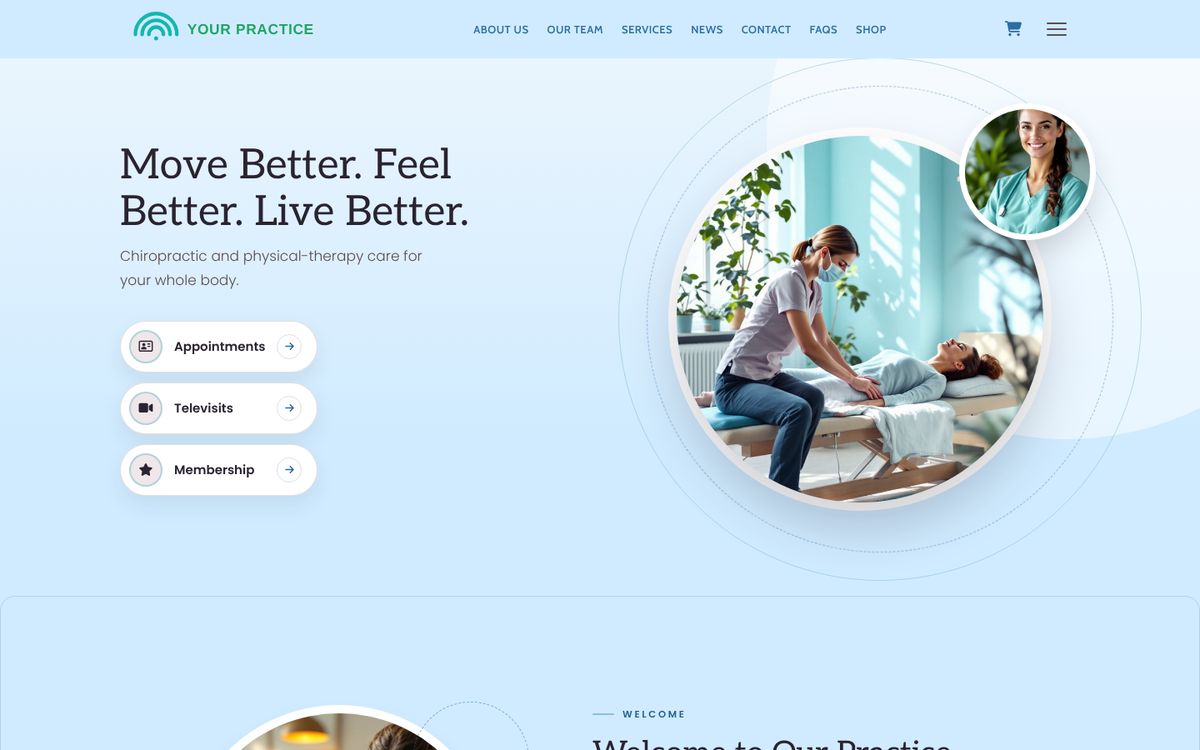
A new patient with back pain does not browse. They search “chiropractor near me” on a phone, read a few reviews, open one website, and decide in under a minute whether to request an appointment. A chiropractic website that brings in new patients is built for that minute. Here is the 2026 checklist — what the page has to answer, in the order the patient asks.
Short answer: a page for each condition you treat, a visible way to request an appointment, new-patient paperwork completed online before the first visit, recent reviews on the site, a Google Business Profile that matches the website, a design that signals calm and competence, and HIPAA-aware handling of every form.
1. Condition pages, not just “services”
Patients search their problem, not your technique: low back pain, sciatica, neck pain, headaches, whiplash after a car accident, sports injuries, pregnancy-related back pain. A page for each condition — what it is, how chiropractic care approaches it, what a first visit looks like — gives Google a page to rank for that search and gives the patient the reassurance they came for. Keep each page descriptive, not diagnostic: it explains your approach, it does not tell the reader what they have.
2. An appointment request on every page
The patient who has decided wants to act before the pain changes their mind. A request flow — choose “new patient consultation” or “adjustment,” pick a preferred time, submit — needs to be reachable from every page, including every condition page. Your front desk confirms the time; the patient gets the relief of having done something. The numbers behind patient expectations for online booking are in our online scheduling guide.
On Clinical Media Hub's Growth and Complete plans, patients request adjustments, consultations and follow-ups from your website and your team confirms them in the dashboard. Foundation includes the website contact form.
3. New-patient paperwork before the visit
First visits run long because of the clipboard. Registration, health history, consent for treatment and financial responsibility can all be completed on the website before the patient walks in — which shortens the visit, improves the data, and tells the patient this is a modern practice. Because those forms contain health information, they need to travel over HIPAA-aware infrastructure and be covered by a Business Associate Agreement with whoever hosts your site.
Clinical Media Hub includes patient registration and the HIPAA notice acknowledgment on every plan; Growth and Complete add consent for treatment, financial responsibility, release of information, medical history and a health-history update for returning patients. Each form starts switched off until you have reviewed its wording, and the BAA is included on every plan.
4. Reviews on the website, not just on Google
Reviews are now the referral. 84% of patients check online reviews before choosing a new provider and 61% prioritize reviews over personal referrals (rater8, 1,008 U.S. patients). Consumers increasingly expect a 4.0+ rating and at least 20 reviews, and a steady flow of recent ones (BrightLocal, 2026). A chiropractic site should show the current Google rating and the latest reviews where a new patient will see them, and the practice needs an ongoing, consent-based way to ask satisfied patients for new ones.
Reply to reviews — but never confirm that the reviewer is a patient or mention their care. Acknowledging a patient relationship in a public reply is a disclosure of protected health information, and practices have paid HIPAA settlements for exactly that. The safe reply pattern is in our local SEO data guide.
5. Local SEO: the website and the Business Profile tell the same story
Your Google Business Profile is the largest group of local ranking signals, and reviews are the next (BrightLocal/Whitespark, 2026). The website's job is to confirm what the profile says: the same practice name, address, phone and hours; a page per location if you have more than one; the conditions and services on the site matching the categories and services on the profile; and MedicalClinic structured data so search engines and AI assistants can read the practice correctly. A website that contradicts the profile — old hours, a different phone number — costs ranking and trust.
6. A design that signals calm and competence
Chiropractic patients are choosing between you and a dozen practices with near-identical service lists; the website's look does the differentiating. The design should feel airy, movement-led and reassuring, load fast on a phone (Google ranks the mobile version of your site, and Core Web Vitals set the bar), and put the provider's face, credentials and approach above the fold. We built Calm & Restorative for exactly this, with Warm & Welcoming as the community-practice alternative — and every design on the platform works for every specialty.
7. Video check-ins and content between visits
Care plans run for weeks; the website should keep patients engaged between adjustments. A short video check-in for questions, a blog post about posture at a desk or stretching after a drive, a social post about a wellness workshop — each one is a reason for an existing patient to come back and a fresh page for Google to index. Clinical Media Hub includes video visits on every plan (500, 5,000 or 10,000 minutes a month by plan) and drafts blog and social content about spinal health and wellness for your city that publishes only after you approve it.
Chiropractic website checklist: a page per condition · appointment request on every page · new-patient forms online, over HIPAA-aware infrastructure with a BAA · current rating and reviews on the site · website and Business Profile in agreement · passes Core Web Vitals on a phone · provider and approach above the fold · video check-ins and monthly content.
See the checklist on a live design: websites and patient tools for chiropractic practices, from $179/month billed annually, 7-day free trial, and plans compared side by side.
Frequently asked questions
What pages does a chiropractic website need?
Home, a page per condition you treat, new-patient information with online forms, about/provider, reviews, contact with location and hours, and an appointment request reachable from every page.
Do chiropractic websites need to be HIPAA-aware?
If the website collects patient information — intake forms, health history, appointment requests with medical detail — HIPAA may apply, and the forms should run on HIPAA-aware infrastructure covered by a Business Associate Agreement with your website vendor.
Can patients book adjustments online?
A request flow — the patient chooses a service and a preferred time, the practice confirms — captures the booking while keeping the schedule under your control. On Clinical Media Hub this is included on Growth and Complete.
How important are reviews for a chiropractor?
Very: reviews are the second-largest group of local ranking signals and most patients read them before choosing a provider. Show them on the website and ask for new ones steadily, with consent.
Sources: BrightLocal & Whitespark Local Search Ranking Factors 2026; BrightLocal Local Consumer Review Survey 2026; rater8, “How Patients Choose Their Doctors” (1,008 U.S. patients, Dec 2024); HHS Office for Civil Rights review-response enforcement; Google Search Central (mobile-first indexing); web.dev Core Web Vitals. Plan facts as published at clinicalmediahub.com/plans.
Ready to grow your practice's online presence? Explore plans and start your 7-day free trial.